03/ Wopet
Redesigned the Wopet smart pet feeder app to address usability issues in the original scheduling interface. The existing design made it difficult for users to quickly understand feeding times, manage multiple schedules, and make changes on the go. The redesign focused on surfacing schedule information more clearly, reducing the steps needed to set or edit a feeding time, and creating a cleaner visual hierarchy that made the app feel intuitive at a glance.
Redesigned the Wopet smart pet feeder app to address usability issues in the original scheduling interface. The existing design made it difficult for users to quickly understand feeding times, manage multiple schedules, and make changes on the go. The redesign focused on surfacing schedule information more clearly, reducing the steps needed to set or edit a feeding time, and creating a cleaner visual hierarchy that made the app feel intuitive at a glance.
February 2025
Product
WoPet
Role
UX Designer
Timeline
1 Week Sprint
03/ Wopet
Redesigned the Wopet smart pet feeder app to address usability issues in the original scheduling interface.
February 2025
Product
WoPet
Role
UX Designer
Timeline
1 Week Sprint
Overview
Overview
Overview
The Product
WoPet makes automatic pet feeders. The companion app is where owners set feeding times, control portion sizes, and check that their pet actually got fed while they're away from home.
WoPet makes automatic pet feeders. The companion app is where owners set feeding times, control portion sizes, and check that their pet actually got fed while they're away from home.
The Task
The original app buries the thing people open it for. You can't tell at a glance when the next feeding is, managing more than one schedule means digging through nested menus, and editing a single time takes more taps than it should.
The original app buries the thing people open it for. You can't tell at a glance when the next feeding is, managing more than one schedule means digging through nested menus, and editing a single time takes more taps than it should.
The Solution
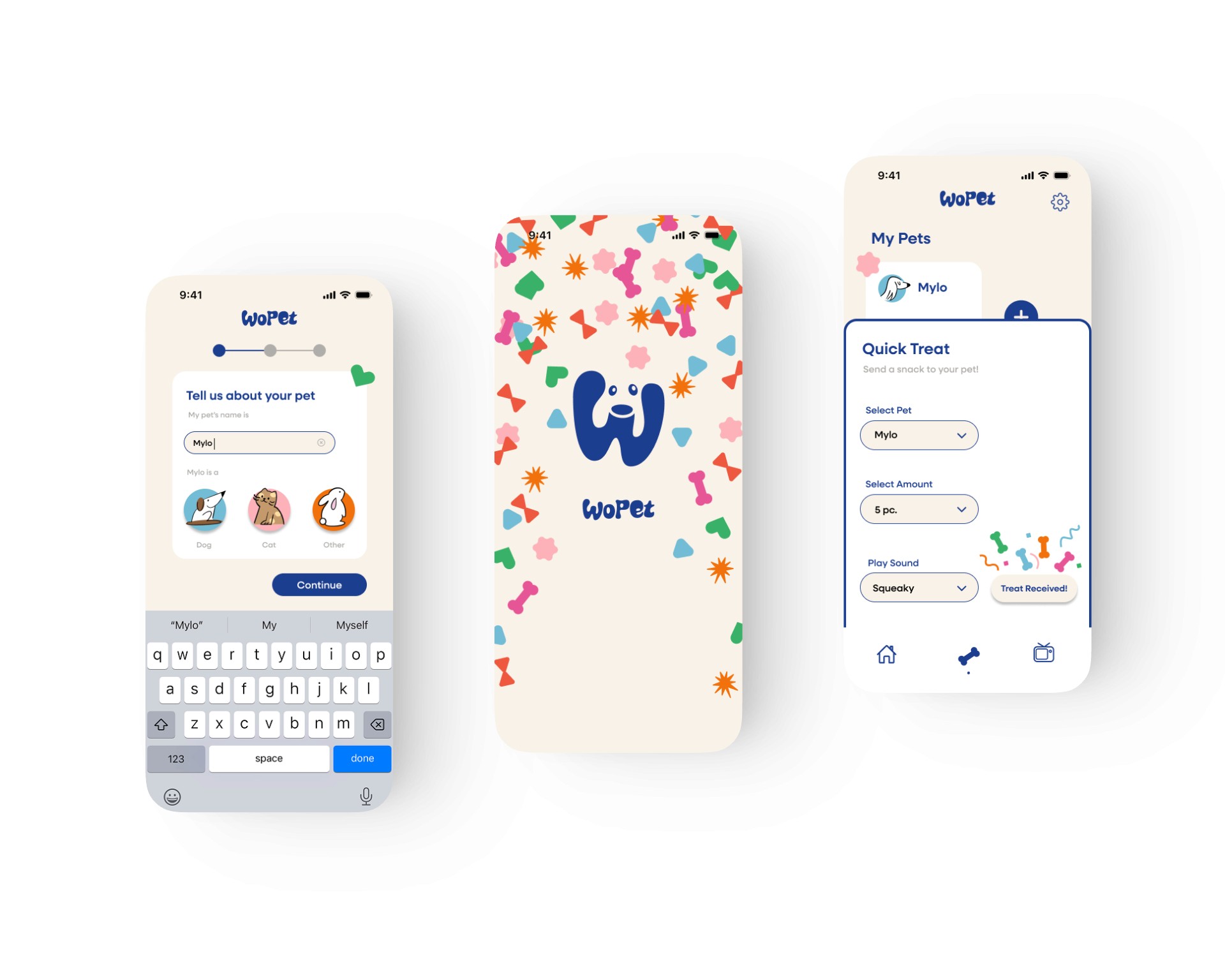
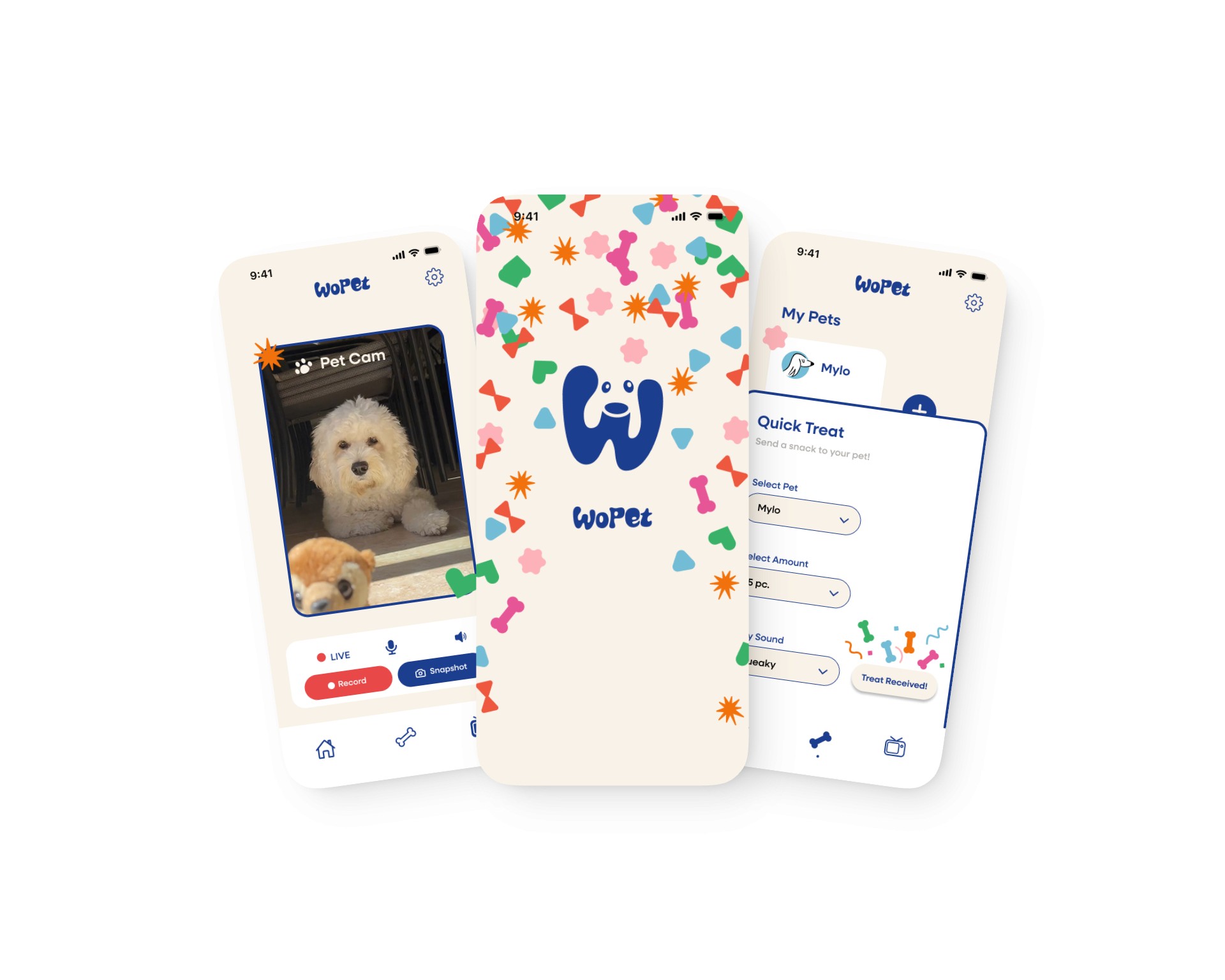
The redesign covers three areas: a new visual system, a clearer home screen, and rebuilt core flows. A and consistent color and type replace the original's styling. The home surfaces each pet's next feeding and connected devices up front. Editing a feeding now sits in one clear flow with visible states, onboarding walks through setup step by step, and Quick Treat, Pet Cam, and microinteractions give owners delight and reason to open the app day to day.
The redesign covers three areas: a new visual system, a clearer home screen, and rebuilt core flows. A and consistent color and type replace the original's styling. The home surfaces each pet's next feeding and connected devices up front. Editing a feeding now sits in one clear flow with visible states, onboarding walks through setup step by step, and Quick Treat, Pet Cam, and microinteractions give owners delight and reason to open the app day to day.
The Product
WoPet makes automatic pet feeders. The companion app is where owners set feeding times, control portion sizes, and check that their pet actually got fed while they're away from home.
The Task
The original app buries the thing people open it for. You can't tell at a glance when the next feeding is, managing more than one schedule means digging through nested menus, and editing a single time takes more taps than it should.
The Solution
The redesign covers three areas: a new visual system, a clearer home screen, and rebuilt core flows. A and consistent color and type replace the original's styling. The home surfaces each pet's next feeding and connected devices up front. Editing a feeding now sits in one clear flow with visible states, onboarding walks through setup step by step, and Quick Treat, Pet Cam, and microinteractions give owners delight and reason to open the app day to day.
Research
To understand where the original WoPet app fell short, I ran a heuristic evaluation of the existing experience, walking through its core flows (setup, scheduling, and editing a feeding) and auditing each screen against Nielsen's usability heuristics. Rather than going off a general feeling that the app was clunky, this let me pinpoint specific breakdowns and tie each one to a principle, so every design decision later traces back to a real problem. Four issues surfaced again and again.
Research
To understand where the original WoPet app fell short, I ran a heuristic evaluation of the existing experience, walking through its core flows (setup, scheduling, and editing a feeding) and auditing each screen against Nielsen's usability heuristics. Rather than going off a general feeling that the app was clunky, this let me pinpoint specific breakdowns and tie each one to a principle, so every design decision later traces back to a real problem. Four issues surfaced again and again.
Research
To understand where the original WoPet app fell short, I ran a heuristic evaluation of the existing experience, walking through its core flows (setup, scheduling, and editing a feeding) and auditing each screen against Nielsen's usability heuristics. Rather than going off a general feeling that the app was clunky, this let me pinpoint specific breakdowns and tie each one to a principle, so every design decision later traces back to a real problem. Four issues surfaced again and again.
No System Visibility Status
The device home screen is mostly empty space, and the schedule is a flat list of identical rows, so there's no clear answer to "when does my pet eat next" or "did the last feeding go through." The information owners open the app for most often, the next feeding time and the most recent feeding result, sits buried behind taps instead of leading the screen.
The schedule view treats every row the same way, so even when the information is technically present, the active or upcoming feeding doesn't stand out from the rest. For a product owners rely on to feed a pet while they're away from home, the lack of a clear at-a-glance answer turns a routine check into a small moment of doubt every time.
The device home screen is mostly empty space, and the schedule is a flat list of identical rows, so there's no clear answer to "when does my pet eat next" or "did the last feeding go through." The information owners open the app for most often, the next feeding time and the most recent feeding result, sits buried behind taps instead of leading the screen.
The schedule view treats every row the same way, so even when the information is technically present, the active or upcoming feeding doesn't stand out from the rest. For a product owners rely on to feed a pet while they're away from home, the lack of a clear at-a-glance answer turns a routine check into a small moment of doubt every time.


Error Prevention
The meal editor shows a time picker labeled "Disabled" and greyed out, with no explanation of why or how to turn it on, which strands users in the middle of a basic task. Onboarding asks people to pick an exact device model, warns that the wrong choice means setup "will not succeed," then has them time a button press and listen for a chime. A whole FAQ tab of troubleshooting ("how to deal with adding failure," "red light keeps flashing") lives in the main navigation, which signals the product expects to break.
Visual Inconsistency + Rough microcopy
The copy reads like rough machine translation, with labels like "Wrong choice, change one," "Ok, that's it," and "Operation Skill" that no native speaker would write. Headings and instructions shift in tone and capitalization from screen to screen, and the visual language is just as uneven: a heavy pink-to-blue gradient dominates most screens, button styling and spacing change between flows, and key states like the "Disabled" picker get no visual explanation.

No System Visibility Status
The device home screen is mostly empty space, and the schedule is a flat list of identical rows, so there's no clear answer to "when does my pet eat next" or "did the last feeding go through." The information owners open the app for most often, the next feeding time and the most recent feeding result, sits buried behind taps instead of leading the screen.
The schedule view treats every row the same way, so even when the information is technically present, the active or upcoming feeding doesn't stand out from the rest. For a product owners rely on to feed a pet while they're away from home, the lack of a clear at-a-glance answer turns a routine check into a small moment of doubt every time.
The device home screen is mostly empty space, and the schedule is a flat list of identical rows, so there's no clear answer to "when does my pet eat next" or "did the last feeding go through." The information owners open the app for most often, the next feeding time and the most recent feeding result, sits buried behind taps instead of leading the screen.
The schedule view treats every row the same way, so even when the information is technically present, the active or upcoming feeding doesn't stand out from the rest. For a product owners rely on to feed a pet while they're away from home, the lack of a clear at-a-glance answer turns a routine check into a small moment of doubt every time.
Error Prevention
The meal editor shows a time picker labeled "Disabled" and greyed out, with no explanation of why or how to turn it on, which strands users in the middle of a basic task. Onboarding asks people to pick an exact device model, warns that the wrong choice means setup "will not succeed," then has them time a button press and listen for a chime. A whole FAQ tab of troubleshooting ("how to deal with adding failure," "red light keeps flashing") lives in the main navigation, which signals the product expects to break.
Visual Inconsistency + Rough microcopy
The copy reads like rough machine translation, with labels like "Wrong choice, change one," "Ok, that's it," and "Operation Skill" that no native speaker would write. Headings and instructions shift in tone and capitalization from screen to screen, and the visual language is just as uneven: a heavy pink-to-blue gradient dominates most screens, button styling and spacing change between flows, and key states like the "Disabled" picker get no visual explanation.
No System Visibility Status
The device home screen is mostly empty space, and the schedule is a flat list of identical rows, so there's no clear answer to "when does my pet eat next" or "did the last feeding go through." The information owners open the app for most often, the next feeding time and the most recent feeding result, sits buried behind taps instead of leading the screen.
The schedule view treats every row the same way, so even when the information is technically present, the active or upcoming feeding doesn't stand out from the rest. For a product owners rely on to feed a pet while they're away from home, the lack of a clear at-a-glance answer turns a routine check into a small moment of doubt every time.
The device home screen is mostly empty space, and the schedule is a flat list of identical rows, so there's no clear answer to "when does my pet eat next" or "did the last feeding go through." The information owners open the app for most often, the next feeding time and the most recent feeding result, sits buried behind taps instead of leading the screen.
The schedule view treats every row the same way, so even when the information is technically present, the active or upcoming feeding doesn't stand out from the rest. For a product owners rely on to feed a pet while they're away from home, the lack of a clear at-a-glance answer turns a routine check into a small moment of doubt every time.
Error Prevention
The meal editor shows a time picker labeled "Disabled" and greyed out, with no explanation of why or how to turn it on, which strands users in the middle of a basic task. Onboarding asks people to pick an exact device model, warns that the wrong choice means setup "will not succeed," then has them time a button press and listen for a chime. A whole FAQ tab of troubleshooting ("how to deal with adding failure," "red light keeps flashing") lives in the main navigation, which signals the product expects to break.
Visual Inconsistency + Rough microcopy
The copy reads like rough machine translation, with labels like "Wrong choice, change one," "Ok, that's it," and "Operation Skill" that no native speaker would write. Headings and instructions shift in tone and capitalization from screen to screen, and the visual language is just as uneven: a heavy pink-to-blue gradient dominates most screens, button styling and spacing change between flows, and key states like the "Disabled" picker get no visual explanation.
WoPet App Store Reviews
"App is terrible, drops connection to feeder and will not keep wifi screening open long enough to connect as if new"
"This keeps changing the feeding times. Also changing the amount. I can't trust it to feed my cats need if I need to day travel."
"I'm trying to register with a password but this partial stupid error message flashes too fast to read. I'll spend the additional $$ to try another brand and send this back"
The four research findings translated into three design principles every screen had to pass.
The four research findings translated into three design principles every screen had to pass.
Consistent Systems + Delight
A unified visual and copy system across every screen, with typography, color, and tone that feel warm, intentional, and made for pet owners rather than pulled from a generic IoT template.
Feeding: Front & Center
The next meal is the first thing owners see when they open the app, with each pet's schedule visible at a glance so no one has to dig through tabs to answer the question that brought them here.
Clear Task Flows
Setup, scheduling, and editing each move forward in a single path with visible states and clear feedback, so owners always know where they are, what just happened, and what comes next.
Define
The four research findings translated into three design principles every screen had to pass.
Consistent Systems + Delight
A unified visual and copy system across every screen, with typography, color, and tone that feel warm, intentional, and made for pet owners rather than pulled from a generic IoT template.
Feeding: Front & Center
The next meal is the first thing owners see when they open the app, with each pet's schedule visible at a glance so no one has to dig through tabs to answer the question that brought them here.
Clear Task Flows
Setup, scheduling, and editing each move forward in a single path with visible states and clear feedback, so owners always know where they are, what just happened, and what comes next.
Define
Ideate
Playful, hand drawn, soft colors
Balancing a clear interface with visual delight
Pet-forward imagery, confetti
Illustrations to highlight the visual language
Visual Identity: Moodboarding
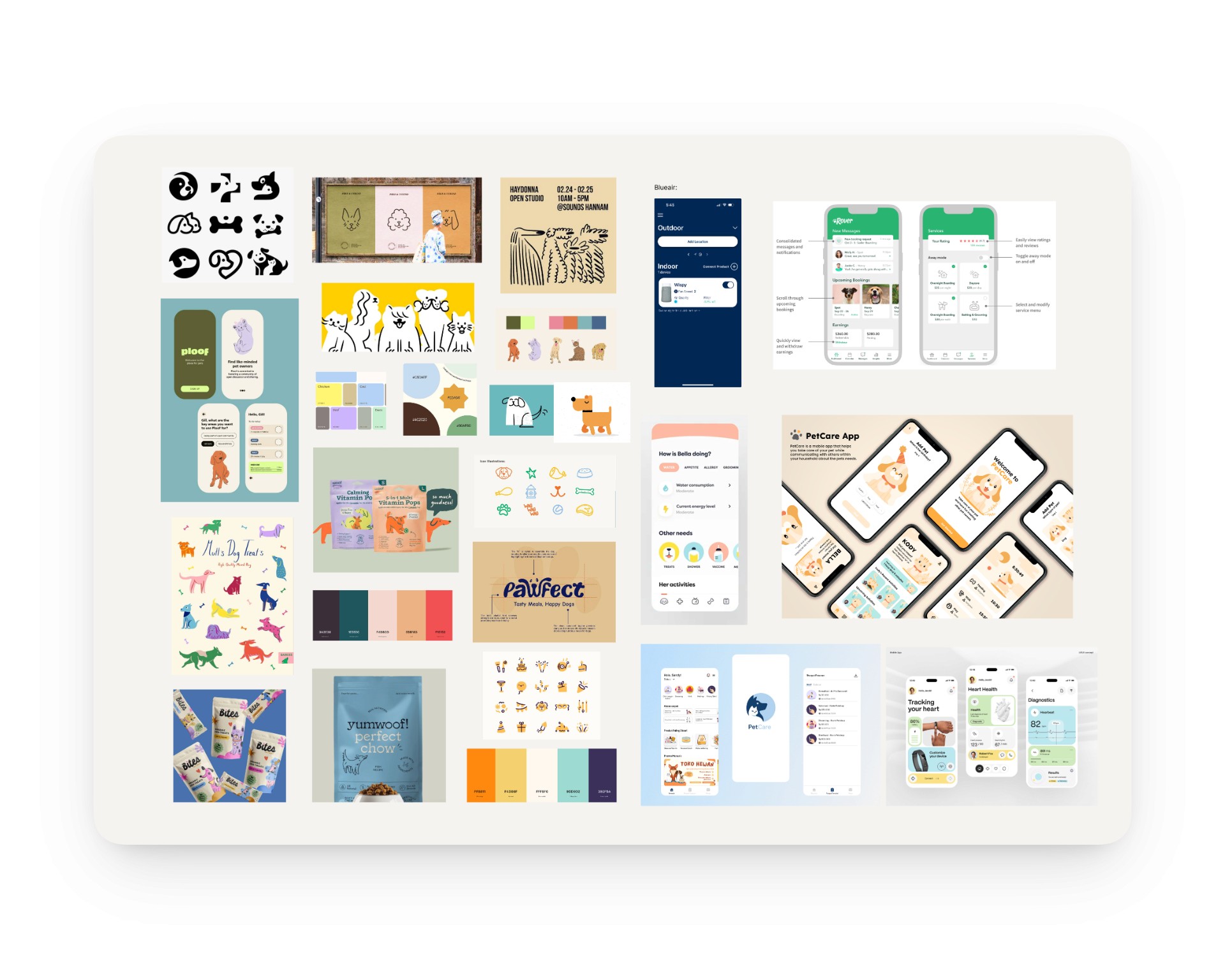
The original app felt inconsistent and didn't match the purpose of the app, so I started by collecting references that captured the warmth and personality I wanted the redesign to have. The board pulled from playful brand identities, hand-drawn marks, soft color palettes, and pet-forward imagery. It became the visual north star for every decision after, from the bouncy wordmark to the confetti motif to the rounded, friendly type.
Sketches
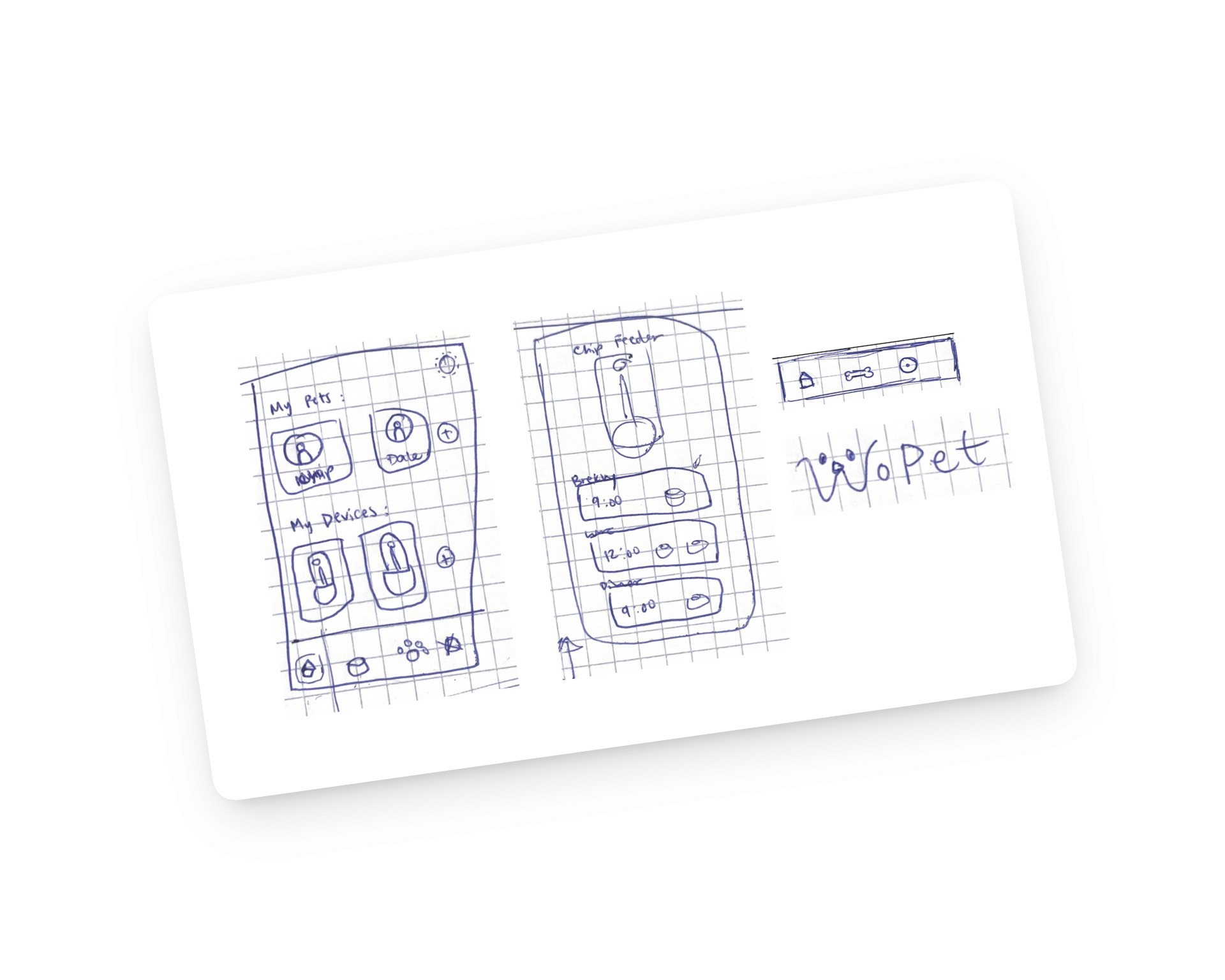
Worked through the layout of the home, schedule, and onboarding screens on paper before committing anything to Figma, so structure could move quickly without getting attached to polish.

Illustrations + Logo Iterations
Explored dozens of mark and illustration directions to land on a wordmark and visual cast that felt warm, playful, and unmistakably WoPet.
Ideate
Playful, hand drawn, soft colors
Balancing a clear interface with visual delight
Pet-forward imagery, confetti
Illustrations to highlight the visual language
Visual Identity: Moodboarding
The original app felt inconsistent and didn't match the purpose of the app, so I started by collecting references that captured the warmth and personality I wanted the redesign to have. The board pulled from playful brand identities, hand-drawn marks, soft color palettes, and pet-forward imagery. It became the visual north star for every decision after, from the bouncy wordmark to the confetti motif to the rounded, friendly type.
Sketches
Worked through the layout of the home, schedule, and onboarding screens on paper before committing anything to Figma, so structure could move quickly without getting attached to polish.
Illustrations + Logo Iterations
Explored illustration directions to land on a wordmark and visual cast that felt warm & playful
Iterate
Iterations + What didn't work
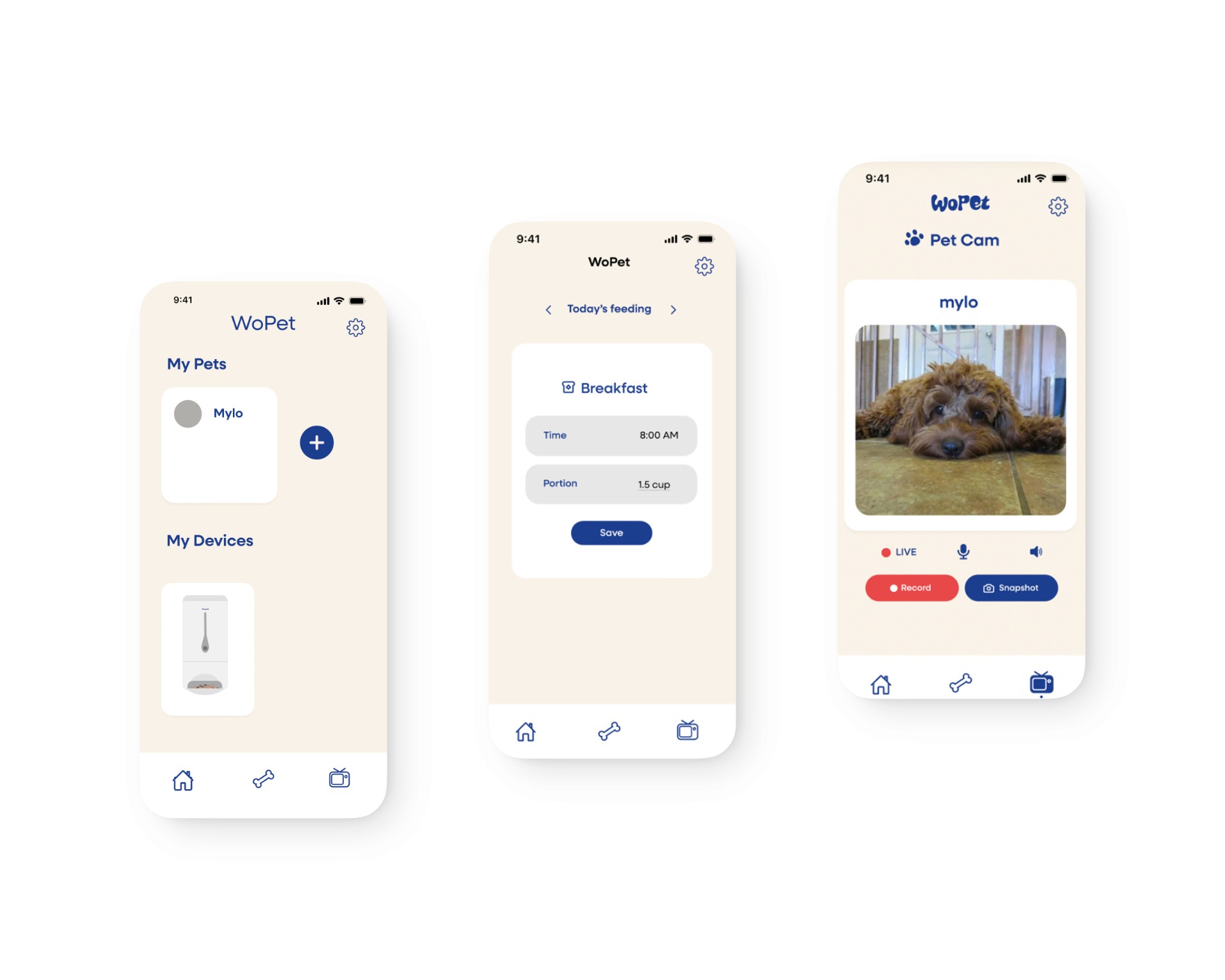
The home screen first launched with empty pet cards and no schedule preview, which technically met the "next feeding visible" principle on the schedule page but failed it at the top level.
The edit-feeding sheet started minimal but felt thin without context about which pet or which meal was being edited. And the first Pet Cam draft buried the live indicator and made the record button compete with the camera feed for attention.
Each one got pulled back to the same question: does this screen answer what an owner came for in one glance? When the answer was no, the screen got rebuilt.
Iterate
Iterations + What didn't work
The home screen first launched with empty pet cards and no schedule preview, which technically met the "next feeding visible" principle on the schedule page but failed it at the top level.
The edit-feeding sheet started minimal but felt thin without context about which pet or which meal was being edited. And the first Pet Cam draft buried the live indicator and made the record button compete with the camera feed for attention.
Each one got pulled back to the same question: does this screen answer what an owner came for in one glance? When the answer was no, the screen got rebuilt.
Design System
Building the System
A core palette of warm beiges, soft blues, and a deeper navy anchors the brand, with secondary pinks, oranges, and greens for accents and the confetti motif. Neulis Sans handles the typography, friendly enough to feel approachable but structured enough to keep dense screens like the schedule readable. Buttons, icons, and navigation each have defined states
Together, the system replaces the original app's gradient-heavy, inconsistent styling with a consistent visual language that reinforces trust in the product.
Friendly, claming colors, vibrant microinteractions
Balancing a clear interface with visual delight
Illustrations to tie together the visual system
Consistent layouts, defined states
Building the System
A core palette of warm beiges, soft blues, and a deeper navy anchors the brand, with secondary pinks, oranges, and greens for accents and the confetti motif. Neulis Sans handles the typography, friendly enough to feel approachable but structured enough to keep dense screens like the schedule readable. Buttons, icons, and navigation each have defined states
Together, the system replaces the original app's gradient-heavy, inconsistent styling with a consistent visual language that reinforces trust in the product.

Design System
Building the System
A core palette of warm beiges, soft blues, and a deeper navy anchors the brand, with secondary pinks, oranges, and greens for accents and the confetti motif. Neulis Sans handles the typography, friendly enough to feel approachable but structured enough to keep dense screens like the schedule readable. Buttons, icons, and navigation each have defined states
Together, the system replaces the original app's gradient-heavy, inconsistent styling with a consistent visual language that reinforces trust in the product.
Friendly, claming colors, vibrant microinteractions
Balancing a clear interface with visual delight
Illustrations to tie together the visual system
Consistent layouts, defined states
Building the System
A core palette of warm beiges, soft blues, and a deeper navy anchors the brand, with secondary pinks, oranges, and greens for accents and the confetti motif. Neulis Sans handles the typography, friendly enough to feel approachable but structured enough to keep dense screens like the schedule readable. Buttons, icons, and navigation each have defined states
Together, the system replaces the original app's gradient-heavy, inconsistent styling with a consistent visual language that reinforces trust in the product.
Solution
To understand where the original WoPet app fell short, I ran a heuristic evaluation of the existing experience, walking through its core flows (setup, scheduling, and editing a feeding) and auditing each screen against Nielsen's usability heuristics. Rather than going off a general feeling that the app was clunky, this let me pinpoint specific breakdowns and tie each one to a principle, so every design decision later traces back to a real problem. Four issues surfaced again and again.
Feeding, front and center
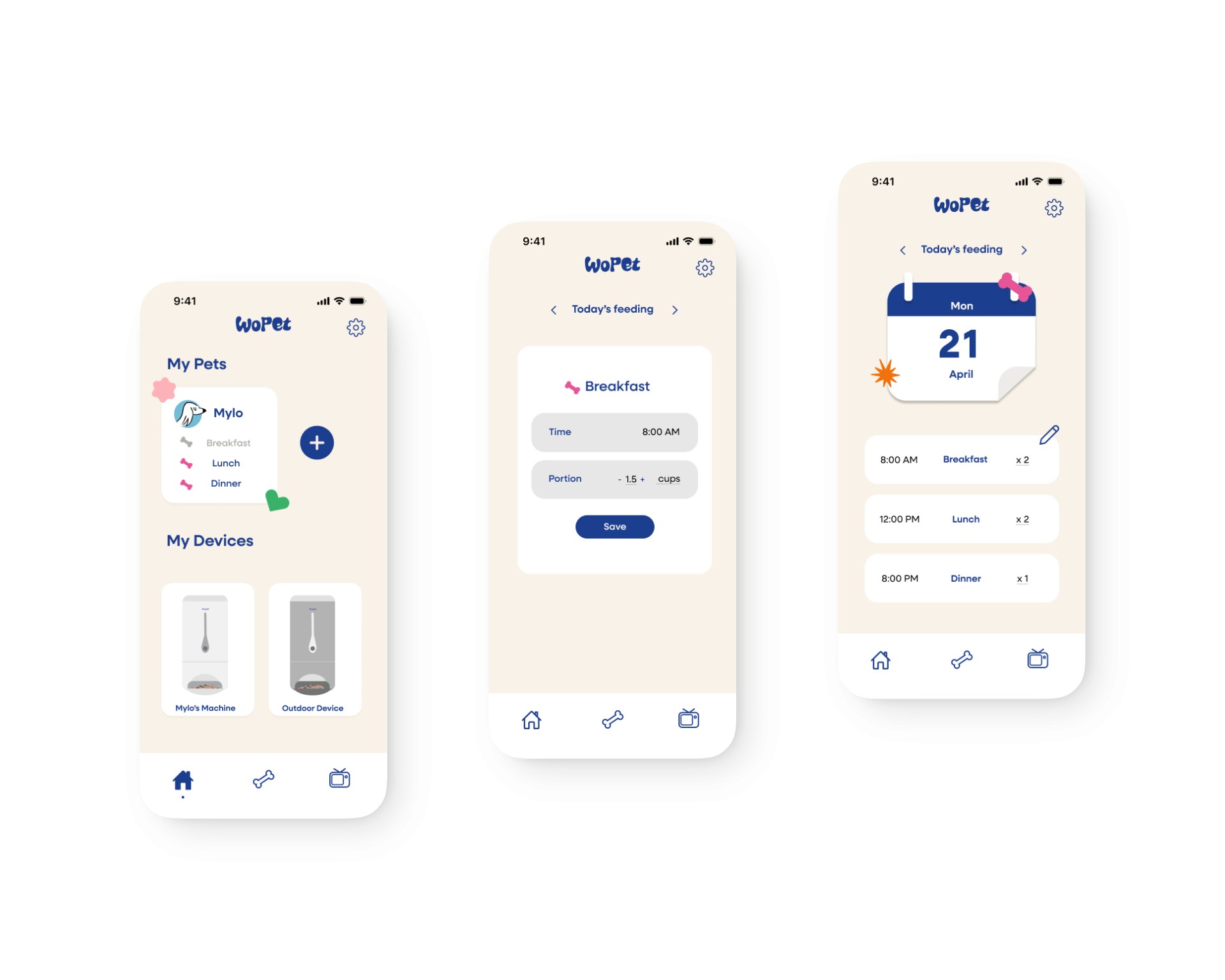
The new home leads with each pet's name and their next scheduled meal, visible without scrolling or tapping into another screen. A separate "Today's feeding" view backs it up with a clean calendar and a list of times and portions for the day. Owners now answer "when does my pet eat next" the second they open the app.

Guided Setup
Onboarding walks owners through naming their pet, picking a type, and adding profile details step by step, with a progress indicator at the top so they always know where they are in the flow.
Clear editing Flow + Microinteractions
Editing a feeding now sits in one sheet with visible states for time, portion, recording, and meal name, every control labeled and active. No greyed-out pickers without explanation, no nested menus to back out of. Owners can adjust a meal and confirm the change in a few taps.
Solution
To understand where the original WoPet app fell short, I ran a heuristic evaluation of the existing experience, walking through its core flows (setup, scheduling, and editing a feeding) and auditing each screen against Nielsen's usability heuristics. Rather than going off a general feeling that the app was clunky, this let me pinpoint specific breakdowns and tie each one to a principle, so every design decision later traces back to a real problem. Four issues surfaced again and again.
Feeding, front and center
The new home leads with each pet's name and their next scheduled meal, visible without scrolling or tapping into another screen. A separate "Today's feeding" view backs it up with a clean calendar and a list of times and portions for the day. Owners now answer "when does my pet eat next" the second they open the app.
Guided Setup
Onboarding walks owners through naming their pet, picking a type, and adding profile details step by step, with a progress indicator at the top so they always know where they are in the flow.
Clear editing Flow + Microinteractions
Editing a feeding now sits in one sheet with visible states for time, portion, recording, and meal name, every control labeled and active. No greyed-out pickers without explanation, no nested menus to back out of. Owners can adjust a meal and confirm the change in a few taps.
The four research findings translated into three design principles every screen had to pass.
Consistent Systems + Delight
A unified visual and copy system across every screen, with typography, color, and tone that feel warm, intentional, and made for pet owners rather than pulled from a generic IoT template.
Feeding: Front & Center
The next meal is the first thing owners see when they open the app, with each pet's schedule visible at a glance so no one has to dig through tabs to answer the question that brought them here.
Creating Delight
Setup, scheduling, and editing each move forward in a single path with visible states and clear feedback, so owners always know where they are, what just happened, and what comes next.
Consistent Systems + Delight
A unified visual and copy system across every screen, with typography, color, and tone that feel warm, intentional, and made for pet owners rather than pulled from a generic IoT template.
Feeding: Front & Center
The next meal is the first thing owners see when they open the app, with each pet's schedule visible at a glance so no one has to dig through tabs to answer the question that brought them here.
Creating Delight
Setup, scheduling, and editing each move forward in a single path with visible states and clear feedback, so owners always know where they are, what just happened, and what comes next.
Takeaways & Key learnings
The four research findings translated into three design principles every screen had to pass.
Consistent Systems + Delight
A unified visual and copy system across every screen, with typography, color, and tone that feel warm, intentional, and made for pet owners rather than pulled from a generic IoT template.
Feeding: Front & Center
The next meal is the first thing owners see when they open the app, with each pet's schedule visible at a glance so no one has to dig through tabs to answer the question that brought them here.
Creating Delight
Setup, scheduling, and editing each move forward in a single path with visible states and clear feedback, so owners always know where they are, what just happened, and what comes next.